How to Upgrade Mobikwik Wallet


How to Upgrade Mobikwik Wallet


Simple, Fast, Hassle Free Payments


About MOBIKWIK WALLET

How about getting the best recharge plan, sms or data pack when you recharge your prepaid mobile? Also, wouldn’t you be interested in getting the best offer for your postpaid bill payments, datacard, broadband, electricity or utility bills. Mobikwik wallet app is the most secure, simple & fastest way to find the recharge plan of your choice. We have all the Topup, SMS, Data (GPRS, 2G, 3G and 4G), Local, STD, ISD, Postpaid, DTH plans, Vouchers and Full Talk Time offers on our app.


Trusted by more than 25 million smartphone users, MobiKwik wallet can be used to:

Recharge mobile, DTH, and for paying postpaid, broadband, datacard, electricity, gas, utility bills

• Shop on various shopping, food, travel websites & apps and avail exclusive offers.
• Shop offline at various restaurants, café, super-markets, gift shops & pay cashless.
• Transfer and receive money instantly to anyone with an email or mobile number!


How to Upgrade Your Mobikwik Wallet

Say goodbye to the Rs.10,000 monthly wallet limit.


 Using MOBIKWIK Site
  • Go to Mobikwik wallet upgrade page from Here.

  • Log-in in to your Mobikwik account

  • Enter Date of Birth, attach ID proof and Address proof, select your state and city

  • Finally click on Submit to wallet upgrade button to complete the process


Using MOBIKWIK App
  • Download & Install  MOBIKWIK App 

  • Log-in to your mobikwik account

  • Then tap on Menu icon from the top right side of the app

  • Select Upgrade wallet option from it

  • On next page click on Get Started button from below

  • Now pop-up will ask you to turn on the location and simply select Turn on button

  • Then add below details
    • Upload your photo (size less 2 MB)
    • Enter your date of  birth
    • Click on Select ID proof and choose the ID proof from the list that you would like to submit
    • Add/upload your ID proof by clicking on the Attach button
    • Tap on Address proof type and select the proof that you want to submit
    • Hit Attach button take a photo of it or upload it directly from your phone
  • Fnally click on submit button to complete the initial process.


 Download Mobikwik App 


Benefits of Upgrading Mobikwik Account

Upgrading will give you more control over your wallet and transactions can be done more easily. Here are some benefits that get when you upgrade your wallet.

  • You can store upto Rs.100000 cash in your wallet

  • During a single transaction you can transfer upto Rs.50000 to other wallet

  • As by mobikwik they can deliver more customized and exclusive offers when you upgrade your wallet


#TodaysDiscountOffers


How to Upgrade Mobikwik Wallet


Simple, Fast, Hassle Free Payments


About MOBIKWIK WALLET

How about getting the best recharge plan, sms or data pack when you recharge your prepaid mobile? Also, wouldn’t you be interested in getting the best offer for your postpaid bill payments, datacard, broadband, electricity or utility bills. Mobikwik wallet app is the most secure, simple & fastest way to find the recharge plan of your choice. We have all the Topup, SMS, Data (GPRS, 2G, 3G and 4G), Local, STD, ISD, Postpaid, DTH plans, Vouchers and Full Talk Time offers on our app.


Trusted by more than 25 million smartphone users, MobiKwik wallet can be used to:

Recharge mobile, DTH, and for paying postpaid, broadband, datacard, electricity, gas, utility bills

• Shop on various shopping, food, travel websites & apps and avail exclusive offers.
• Shop offline at various restaurants, café, super-markets, gift shops & pay cashless.
• Transfer and receive money instantly to anyone with an email or mobile number!


How to Upgrade Your Mobikwik Wallet

Say goodbye to the Rs.10,000 monthly wallet limit.


 Using MOBIKWIK Site
  • Go to Mobikwik wallet upgrade page from Here.

  • Log-in in to your Mobikwik account

  • Enter Date of Birth, attach ID proof and Address proof, select your state and city

  • Finally click on Submit to wallet upgrade button to complete the process


Using MOBIKWIK App
  • Download & Install  MOBIKWIK App 

  • Log-in to your mobikwik account

  • Then tap on Menu icon from the top right side of the app

  • Select Upgrade wallet option from it

  • On next page click on Get Started button from below

  • Now pop-up will ask you to turn on the location and simply select Turn on button

  • Then add below details
    • Upload your photo (size less 2 MB)
    • Enter your date of  birth
    • Click on Select ID proof and choose the ID proof from the list that you would like to submit
    • Add/upload your ID proof by clicking on the Attach button
    • Tap on Address proof type and select the proof that you want to submit
    • Hit Attach button take a photo of it or upload it directly from your phone
  • Fnally click on submit button to complete the initial process.


 Download Mobikwik App 


Benefits of Upgrading Mobikwik Account

Upgrading will give you more control over your wallet and transactions can be done more easily. Here are some benefits that get when you upgrade your wallet.

  • You can store upto Rs.100000 cash in your wallet

  • During a single transaction you can transfer upto Rs.50000 to other wallet

  • As by mobikwik they can deliver more customized and exclusive offers when you upgrade your wallet


#TodaysDiscountOffers

Heybiz App: Refer and Earn Paytm Cash & Rewards


HeyBiz brings Local services to your smartphone. No more searches, reading tons of reviews, comparing prices on different sites for a product or service. No credit card payments, waiting for days to get product to your door.

Tried this App and successfully got 3 products from them, hence its fully genuine so I recommend you all to must try once and grab free rewards.

Now you can also redeem your points in form of Paytm cash. To redeem Rs.50 Paytm cash, you need 300 Points.


Steps To Follow :

1. Download 
HeyBiz App  From  Here
    (Open in Android Only)

2. Create New Account & verify your mobile number.

3. Finally goto Menu tab from left corner tab and
select "Share to Friends" options.

4. Now start referring your friends & follow Business to earn more points. Per referral you will get 50 points.

5. Once you reach redemption threshold,

You can redeem your points against Free Recharges and free products


Products & Points:

Bajrangi Bhaijaan Pendant : 2400 Points.

Rs.50 Paytm Cash : 300 Points.

Digital LED Watch : 600 Points.

Universal Mini USB car Charger : 600 Points.

Nivia Encounter Shaker : 800 Points.

Selfie Stick : 900 Points.

Nova Hair Straightener : 1000 Points.

Watch with Leather Strap : 1000 Points.

Jack Daniel Hip Flask : 1150 Points.

Bean Bag Cover : 1400 Points.

Printed Cushion : 1400 Points.

Mobile Recharge : 250 Points


And many more products


#TodaysDiscountOffers


HeyBiz brings Local services to your smartphone. No more searches, reading tons of reviews, comparing prices on different sites for a product or service. No credit card payments, waiting for days to get product to your door.

Tried this App and successfully got 3 products from them, hence its fully genuine so I recommend you all to must try once and grab free rewards.

Now you can also redeem your points in form of Paytm cash. To redeem Rs.50 Paytm cash, you need 300 Points.


Steps To Follow :

1. Download 
HeyBiz App  From  Here
    (Open in Android Only)

2. Create New Account & verify your mobile number.

3. Finally goto Menu tab from left corner tab and
select "Share to Friends" options.

4. Now start referring your friends & follow Business to earn more points. Per referral you will get 50 points.

5. Once you reach redemption threshold,

You can redeem your points against Free Recharges and free products


Products & Points:

Bajrangi Bhaijaan Pendant : 2400 Points.

Rs.50 Paytm Cash : 300 Points.

Digital LED Watch : 600 Points.

Universal Mini USB car Charger : 600 Points.

Nivia Encounter Shaker : 800 Points.

Selfie Stick : 900 Points.

Nova Hair Straightener : 1000 Points.

Watch with Leather Strap : 1000 Points.

Jack Daniel Hip Flask : 1150 Points.

Bean Bag Cover : 1400 Points.

Printed Cushion : 1400 Points.

Mobile Recharge : 250 Points


And many more products


#TodaysDiscountOffers

Snapdeal App Refer & Earn: Get Rs.150 per Refer


Snapdeal App: Refer and Earn

 Snapdeal Refer And Earn 


Snapdeal is back again with refer & earn program. They are offering Free Rs.100 Freecharge Wallet Money on sign up + Rs.100 When you refer your friend. Your friend should make purchase of minimum Rs.100, then you will get 100 rs in your freecharge account. so checkout more details from below.


How to Sign up & Get Rs.100 Freecharge Credits + Refer & Earn


               ocZH744614

  • If you download from above link, then only you will get Rs.100 Freecharge wallet after your make your first purchase.

  • Rs.100 Will be credited in account after 48 hours of delivery of product.

  • Click on yes, Earn Rewards button, if you want to get Rs.100 freecharge wallet money


 Snapdeal Refer And Earn  


Terms & Conditions:
  • Refer & Earn is valid for all new + old users, also valid for previous users who used snapdeal refer & earn last time.

  • New Users Who sign up from refer link, he / she will get 100 rs freecharge credits after make first purchase in 48 hours

  • Referrer friend will only get 100 rs when his / her friend make their first purchase on snapdeal of minimum 100rs

  • Valid only for limited time

  • Maximum Reward for refer friends will be 2500 rs.
    (16 friends) for One Sneapdeal ID

>   FAQ 


Snapdeal App: Refer and Earn

 Snapdeal Refer And Earn 


Snapdeal is back again with refer & earn program. They are offering Free Rs.100 Freecharge Wallet Money on sign up + Rs.100 When you refer your friend. Your friend should make purchase of minimum Rs.100, then you will get 100 rs in your freecharge account. so checkout more details from below.


How to Sign up & Get Rs.100 Freecharge Credits + Refer & Earn


               ocZH744614

  • If you download from above link, then only you will get Rs.100 Freecharge wallet after your make your first purchase.

  • Rs.100 Will be credited in account after 48 hours of delivery of product.

  • Click on yes, Earn Rewards button, if you want to get Rs.100 freecharge wallet money


 Snapdeal Refer And Earn  


Terms & Conditions:
  • Refer & Earn is valid for all new + old users, also valid for previous users who used snapdeal refer & earn last time.

  • New Users Who sign up from refer link, he / she will get 100 rs freecharge credits after make first purchase in 48 hours

  • Referrer friend will only get 100 rs when his / her friend make their first purchase on snapdeal of minimum 100rs

  • Valid only for limited time

  • Maximum Reward for refer friends will be 2500 rs.
    (16 friends) for One Sneapdeal ID

>   FAQ 

How To Use WhatsApp Without Your Own Number Using Voxox App


How To Use WhatsApp Without Your Own Number using Voxox App


Voxox App FREE features:
  • Receive inbound calls with a FREE US Phone Number
  • Forward calls to ANY phone number in the world with Reach Me!
  • Read your voicemails with Voicemail Transcription
  • Call Recording
  • Language Translation - translate SMS messages real time in dozens of languages.
  • Conference Calling
  • Direct and Group Messaging
  • Photo ,Video, Location and Contact Sharing


 WhatsApp Without Your Own Number Steps:

1) Download & install Voxox app from  Here

2) Once you download, create new account.

3) Now goto "More" tab, there you will find your Voxox number, just note it down.

4) Now Start WhatsApp and enter Voxox number at the time of verification.

5) Finally, You will get a notification after entering the number,
Just click on that and you will redirected to Whatsapp.


.


How To Use WhatsApp Without Your Own Number using Voxox App


Voxox App FREE features:
  • Receive inbound calls with a FREE US Phone Number
  • Forward calls to ANY phone number in the world with Reach Me!
  • Read your voicemails with Voicemail Transcription
  • Call Recording
  • Language Translation - translate SMS messages real time in dozens of languages.
  • Conference Calling
  • Direct and Group Messaging
  • Photo ,Video, Location and Contact Sharing


 WhatsApp Without Your Own Number Steps:

1) Download & install Voxox app from  Here

2) Once you download, create new account.

3) Now goto "More" tab, there you will find your Voxox number, just note it down.

4) Now Start WhatsApp and enter Voxox number at the time of verification.

5) Finally, You will get a notification after entering the number,
Just click on that and you will redirected to Whatsapp.


.

Nearbuy Offers: Get Flat 50% Discount


Nearbuy Offers: Get Flat 50% Discount on Any Products


Steps:
  • Goto Nearbuy Registration Page:  Click Here 
  • Enter Credential Details i.e Name, Email, Mobile Number and Password
  • Verify Your Mobile Number Using OTP
  • Select Your City
  • IF Your City Not Appears in List Then You Can Only Grab Online Vouchers Like Dominos, Paytm, PVR Etc
  • Select any Product Under Rs 300
  • Now Click to BUY NOW Button
  • Now Use a Unique Promo Code:


  • You'll Get Flat Discount 50% Maximum Upto Rs.300/-
  • The Great Thing About This Offer is,
    No Need Of Any Minimum Purchas


#TodaysDiscountOffers


.


Nearbuy Offers: Get Flat 50% Discount on Any Products


Steps:
  • Goto Nearbuy Registration Page:  Click Here 
  • Enter Credential Details i.e Name, Email, Mobile Number and Password
  • Verify Your Mobile Number Using OTP
  • Select Your City
  • IF Your City Not Appears in List Then You Can Only Grab Online Vouchers Like Dominos, Paytm, PVR Etc
  • Select any Product Under Rs 300
  • Now Click to BUY NOW Button
  • Now Use a Unique Promo Code:


  • You'll Get Flat Discount 50% Maximum Upto Rs.300/-
  • The Great Thing About This Offer is,
    No Need Of Any Minimum Purchas


#TodaysDiscountOffers


.

My idea APP Offer: Get 100 MB to 1 Gb Mobile Internet Data at Rs.1


My idea APP Offer:
Get 100 MB to 1 Gb Mobile Internet Data at Rs.1


In this  offer you will get around 100 MB to 1 GB internet , minimum guarantee is 100 Mb and you can get a maximum of 1Gb so grab this before it ends.


Steps to do Get 100MB-1GB internet

  • Download the  Myidea  app  from  Play Store 

  • Sign up with your idea mobile number you will get OTP and verify it

  • Next step is you will see a tab of 100 MB to 1 GB internet for Rs.1 click on it

  • Next enter Coupon code as  APP1  and click on confirm

  • Next click on Rs.1 and it will show a Popup click confirm

  • Pay Rs.1 with idea money OR Debit card

  • Done! you got (100MB-1GB internet)


#TodaysDiscountOffers

.

My idea APP Offer:
Get 100 MB to 1 Gb Mobile Internet Data at Rs.1


In this  offer you will get around 100 MB to 1 GB internet , minimum guarantee is 100 Mb and you can get a maximum of 1Gb so grab this before it ends.


Steps to do Get 100MB-1GB internet

  • Download the  Myidea  app  from  Play Store 

  • Sign up with your idea mobile number you will get OTP and verify it

  • Next step is you will see a tab of 100 MB to 1 GB internet for Rs.1 click on it

  • Next enter Coupon code as  APP1  and click on confirm

  • Next click on Rs.1 and it will show a Popup click confirm

  • Pay Rs.1 with idea money OR Debit card

  • Done! you got (100MB-1GB internet)


#TodaysDiscountOffers

.

FreeCharge Rs.50 Cashback On Recharge Rs.50


Get FreeCharge Rs.50 Cashback On Recharge Rs.50 (New Users)


Welcome to FreeCharge Wallet - the fastest mobile app for online recharge & bill payments. Not just easy, safe and secure, it is quick. Pay for your prepaid mobile recharges, postpaid mobile bill, electricity bill payment, dth recharge, landline bills, datacard, and utility bill payments in under 10 seconds.

FreeCharge has introduced the most convenient online mobile wallet for your day to day payments. You can transfer money to the wallet using your Debit / Credit Cards or NetBanking and same can be used for quick mobile recharge & bill payments. No more waiting in queue for mobile recharge or utility bill payment, pay at your fingertips and save your time with FreeCharge.


Steps To Follow For New Users:

1.
Download latest Freecharge application  Download Here

2. Once you download, open it and Register new account & New Mobile Number

3. Now proceed to Recharge with Rs.50 and in Promo code,
Enter this code to get Rs.50 cashback:

       R698J2C   

4. Once you apply above code, you can see success message "Promo code applied successfully...".

5. Now proceed further & make the payment via Debit or Credit card.
 

You'll Get Rs 50 Instant Cashback Once Transaction Success


Terms & Conditions
  • Each unique number recharged during this offer is eligible for ₹50 cashback only once, if the minimum recharged amount is ₹50 or more.
  • Offer is valid for new users on their first transaction only.
  • Offer is valid only once per credit card/debit card.
  • Offer is valid only on the FreeCharge android app.
  • Offer is not valid on Netbanking and wallet cash Transactions.
  • For all other queries please email care@freecharge.com


#TodaysDiscountOffers

Get FreeCharge Rs.50 Cashback On Recharge Rs.50 (New Users)


Welcome to FreeCharge Wallet - the fastest mobile app for online recharge & bill payments. Not just easy, safe and secure, it is quick. Pay for your prepaid mobile recharges, postpaid mobile bill, electricity bill payment, dth recharge, landline bills, datacard, and utility bill payments in under 10 seconds.

FreeCharge has introduced the most convenient online mobile wallet for your day to day payments. You can transfer money to the wallet using your Debit / Credit Cards or NetBanking and same can be used for quick mobile recharge & bill payments. No more waiting in queue for mobile recharge or utility bill payment, pay at your fingertips and save your time with FreeCharge.


Steps To Follow For New Users:

1.
Download latest Freecharge application  Download Here

2. Once you download, open it and Register new account & New Mobile Number

3. Now proceed to Recharge with Rs.50 and in Promo code,
Enter this code to get Rs.50 cashback:

       R698J2C   

4. Once you apply above code, you can see success message "Promo code applied successfully...".

5. Now proceed further & make the payment via Debit or Credit card.
 

You'll Get Rs 50 Instant Cashback Once Transaction Success


Terms & Conditions
  • Each unique number recharged during this offer is eligible for ₹50 cashback only once, if the minimum recharged amount is ₹50 or more.
  • Offer is valid for new users on their first transaction only.
  • Offer is valid only once per credit card/debit card.
  • Offer is valid only on the FreeCharge android app.
  • Offer is not valid on Netbanking and wallet cash Transactions.
  • For all other queries please email care@freecharge.com


#TodaysDiscountOffers

Indiebarter Store Offer: Free Rs.5 Paytm Cash/Refer

Indiebarter Store Offer: Get Free Rs.5 Paytm Cash/Refer


What is indiebarter.com

Indiebarter.com is an online Barter store for exchange of products and services within your college/locality/city. It aims at fitting the barter system back in the daily normal routine of people in the most convenient, interesting and entertaining manner possible.


How to Refer and Earn:

1) Complete Sign up process from this link:  Click Here 

2) Verify mobile number with OTP

3) Start Referring your friends and Earn paytm cash

4) Rs.5 Paytm cash per refer


Note: Offer Valid from 1st Feb to 14th Feb


#TodaysDiscountOffers
Indiebarter Store Offer: Get Free Rs.5 Paytm Cash/Refer


What is indiebarter.com

Indiebarter.com is an online Barter store for exchange of products and services within your college/locality/city. It aims at fitting the barter system back in the daily normal routine of people in the most convenient, interesting and entertaining manner possible.


How to Refer and Earn:

1) Complete Sign up process from this link:  Click Here 

2) Verify mobile number with OTP

3) Start Referring your friends and Earn paytm cash

4) Rs.5 Paytm cash per refer


Note: Offer Valid from 1st Feb to 14th Feb


#TodaysDiscountOffers

Free Sample Offer: Get Free Dabur Brave Beautiful Oil & Shampoo Sample

Get Free Dabur Brave & Beautiful: Oil and Shampoo Sample


The Vatika Brave & Beautiful range is the first of its kind, specially designed and dermatologically tested for the sensitive hair & scalp.
Keeping the medical history and current requirement of its users in mind, these products are mild, contain no harmful chemicals* and are enriched with olive oil extract for the delicate cleansing of sensitive hair & scalp
.


What makes Vatika Brave & Beautiful special?
  • No colour
  • No paraben
  • No sulphate
  • No tears
  • Dermatologically tested
  • Moisturizes
  • Mild on sensitive skin
  • Gentle but effective
  • Rich & Nourishing
  • Pleasant sensorial experience


How To Get FREE Sample:

1. Visit  Dabur Brave & Beautiful Oil and Shampoo Free Sample Page
2. Click On Request Sample Key
 
3. Fill The Form


4. Get Sample From Few Days.


#TodaysDiscountOffers
Get Free Dabur Brave & Beautiful: Oil and Shampoo Sample


The Vatika Brave & Beautiful range is the first of its kind, specially designed and dermatologically tested for the sensitive hair & scalp.
Keeping the medical history and current requirement of its users in mind, these products are mild, contain no harmful chemicals* and are enriched with olive oil extract for the delicate cleansing of sensitive hair & scalp
.


What makes Vatika Brave & Beautiful special?
  • No colour
  • No paraben
  • No sulphate
  • No tears
  • Dermatologically tested
  • Moisturizes
  • Mild on sensitive skin
  • Gentle but effective
  • Rich & Nourishing
  • Pleasant sensorial experience


How To Get FREE Sample:

1. Visit  Dabur Brave & Beautiful Oil and Shampoo Free Sample Page
2. Click On Request Sample Key
 
3. Fill The Form


4. Get Sample From Few Days.


#TodaysDiscountOffers

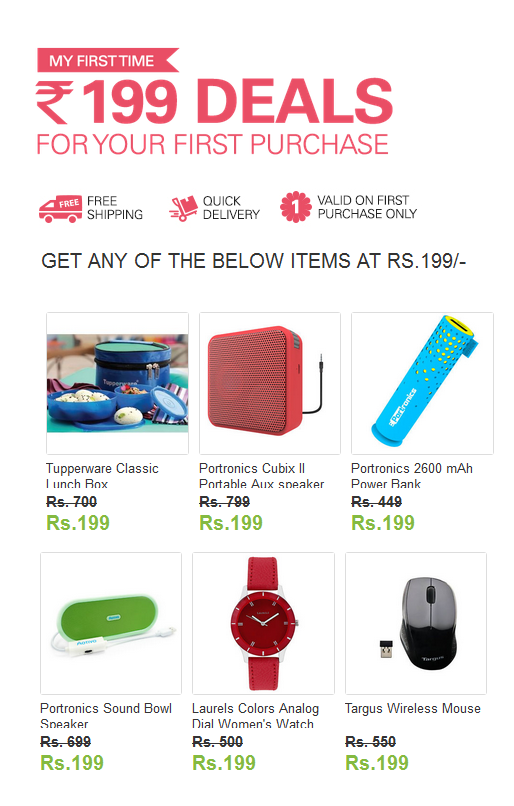
Ebay February Sale: Get Product at Rs.199 Only

Ebay February Sale: Get Product at Rs.199 Only

Ebay again come back to February Loot you can get products at Rs 199 only AND the product offered By ebay is really more than worth of rs 199 only.
New numbers and do register on special sale page to get your discount code.


 Ebay February Sale: Get Product at Rs 199 Only  


Steps To Get Product at Rs 199 Only:

  • First Go to ebay special sale page: [ Ebay Sale Page ]
  • Now Register your self with new number and emai
  • Done ! as you resisted you see congrats message plus instruction.
  
  • Now just wait few hours you Get your Discount code via SMS .
  • Note down this code when sale is started (8 th Feb) use this discount code to get your product at
    Rs.199 only.


Terms & Conditions:
  • The promotion "eBay Rs. 199 Deals February 2016” (hereinafter "Promotion") is valid only for successful PaisaPay transaction on www.eBay.in (hereinafter "eBay Website") during Promotion Period
  • First Time Buyer” means a User who has not completed successful transaction before on eBay Website.
  • The User must be a First Time Buyer on eBay Website while availing this deal.
  • The User must hold a valid/active email id and mobile number.
  • The User shall share the name, mobile number, email address as requested by eBay under the promotion/campaign.


  • The Promotion is valid only for Users with Registered Addresses in India only.
  • eBay shall send a Coupon Code through SMS to the eligible User/s to purchase this product.
  • The Coupon Code will be valid for three days [i.e. from 8th February – 10th February 2016] for redemption.
  • Limited Stock offered by Sellers and shall be valid on First come first serve basis only.

Ebay February Sale: Get Product at Rs.199 Only

Ebay again come back to February Loot you can get products at Rs 199 only AND the product offered By ebay is really more than worth of rs 199 only.
New numbers and do register on special sale page to get your discount code.


 Ebay February Sale: Get Product at Rs 199 Only  


Steps To Get Product at Rs 199 Only:

  • First Go to ebay special sale page: [ Ebay Sale Page ]
  • Now Register your self with new number and emai
  • Done ! as you resisted you see congrats message plus instruction.
  
  • Now just wait few hours you Get your Discount code via SMS .
  • Note down this code when sale is started (8 th Feb) use this discount code to get your product at
    Rs.199 only.


Terms & Conditions:
  • The promotion "eBay Rs. 199 Deals February 2016” (hereinafter "Promotion") is valid only for successful PaisaPay transaction on www.eBay.in (hereinafter "eBay Website") during Promotion Period
  • First Time Buyer” means a User who has not completed successful transaction before on eBay Website.
  • The User must be a First Time Buyer on eBay Website while availing this deal.
  • The User must hold a valid/active email id and mobile number.
  • The User shall share the name, mobile number, email address as requested by eBay under the promotion/campaign.


  • The Promotion is valid only for Users with Registered Addresses in India only.
  • eBay shall send a Coupon Code through SMS to the eligible User/s to purchase this product.
  • The Coupon Code will be valid for three days [i.e. from 8th February – 10th February 2016] for redemption.
  • Limited Stock offered by Sellers and shall be valid on First come first serve basis only.

How to Buy Letv Le 1S Successfully in Flipkart Sale


Buy Letv Le 1S Successfully in Flipkart Sale


Specifications of Letv Le 1s:

  • MTK Helio X10 Processor
  • 3gb Ram 32Gb Internal storage.
  • 5.5 Inch (1920×1080) Full HD display.
  • IR blaster.
  • Fingerprint Scanner.
  • Unibody Metal design
  • 13mp Rear Camera 4k Recording.
  • 5mp Front camera.
  • 3,000 mAh battery.
  • USB TYPE C (Fast Charging)
  • Price 10,999/-


Click here to Register for the 9th Feb 2016 Flash sale:

 http://dl.flipkart.com/dl/letv-le-1s/p/itmefe3sztdzw42g?affid=swapnilza  


How to use Letv Le 1s Script:

  • Click Here to go to  Letv Le 1S  sale page.

    Note:
    For a safe side, open above link in two tabs, apply script in one tab and click manually in second tab.

  • Now after completely loading of page, Right click anywhere on the page.
  • Now click on "Inspect Element" shown last in the options.
    Or else you can also press Ctrl + Shift + I
  • A popup window will appear from bottom.
  • Their you will find a "Console" tab, click on it.
  • Paste the above given Le 1s script in the box. (Ctrl + V)
  • Finally hit on Enter button approx. 5 minutes before sale.
  • Now wait for the script to do its work of adding Le 1s to your cart.
  • After successful adding Le 1s to cart, go ahead for payment procedure.


Letv Le 1S Script:


 var d = new Date(); var eta = 1454394600000-d.getTime();eta++;setTimeout(function(){$('.sale-btn').trigger('click');console.log('clicked, your phone should be in your cart now');},eta); console.log('js is working in background');   


Tips:
  • Use the latest chrome browser for best result.
  • Use the fastest and stable internet connection available to you.
  • Disable all your Extensions.
  • Update Your PC Time


Tags:
How to Buy Letv Le 1S Successfully in Flipkart Sale

.

Buy Letv Le 1S Successfully in Flipkart Sale


Specifications of Letv Le 1s:

  • MTK Helio X10 Processor
  • 3gb Ram 32Gb Internal storage.
  • 5.5 Inch (1920×1080) Full HD display.
  • IR blaster.
  • Fingerprint Scanner.
  • Unibody Metal design
  • 13mp Rear Camera 4k Recording.
  • 5mp Front camera.
  • 3,000 mAh battery.
  • USB TYPE C (Fast Charging)
  • Price 10,999/-


Click here to Register for the 9th Feb 2016 Flash sale:

 http://dl.flipkart.com/dl/letv-le-1s/p/itmefe3sztdzw42g?affid=swapnilza  


How to use Letv Le 1s Script:

  • Click Here to go to  Letv Le 1S  sale page.

    Note:
    For a safe side, open above link in two tabs, apply script in one tab and click manually in second tab.

  • Now after completely loading of page, Right click anywhere on the page.
  • Now click on "Inspect Element" shown last in the options.
    Or else you can also press Ctrl + Shift + I
  • A popup window will appear from bottom.
  • Their you will find a "Console" tab, click on it.
  • Paste the above given Le 1s script in the box. (Ctrl + V)
  • Finally hit on Enter button approx. 5 minutes before sale.
  • Now wait for the script to do its work of adding Le 1s to your cart.
  • After successful adding Le 1s to cart, go ahead for payment procedure.


Letv Le 1S Script:


 var d = new Date(); var eta = 1454394600000-d.getTime();eta++;setTimeout(function(){$('.sale-btn').trigger('click');console.log('clicked, your phone should be in your cart now');},eta); console.log('js is working in background');   


Tips:
  • Use the latest chrome browser for best result.
  • Use the fastest and stable internet connection available to you.
  • Disable all your Extensions.
  • Update Your PC Time


Tags:
How to Buy Letv Le 1S Successfully in Flipkart Sale

.

Adzync: Earn Free Recharge for Watching Ads / Videos


Adzync Site:

Earn Free Recharge for Watching Ads / Videos


Adzync is a free recharge site that pays you money for watching ads and videos on their site. You can also earn by referring your friends. You can redeem this earning through Paytm cash, Freecharge Credits and many more coupons and vouchers.


How to use AdZync
  •  Register on Adzync Site  .
  • Verify your Paytm no. Here  (OTP Required)
  • Then Click on Ads/Videos to Earn Wallet Cash.  
  • Reedem your zyncs wallet to Paytm, Freechage, Other Coupons
  • This is the place where you can convert your zyncs to wallet cash.


  Register on Adzync Site  


 Earn Free Recharge for Clicking Ads / Videos

#TodaysDiscountOffers


Adzync Site:

Earn Free Recharge for Watching Ads / Videos


Adzync is a free recharge site that pays you money for watching ads and videos on their site. You can also earn by referring your friends. You can redeem this earning through Paytm cash, Freecharge Credits and many more coupons and vouchers.


How to use AdZync
  •  Register on Adzync Site  .
  • Verify your Paytm no. Here  (OTP Required)
  • Then Click on Ads/Videos to Earn Wallet Cash.  
  • Reedem your zyncs wallet to Paytm, Freechage, Other Coupons
  • This is the place where you can convert your zyncs to wallet cash.


  Register on Adzync Site  


 Earn Free Recharge for Clicking Ads / Videos

#TodaysDiscountOffers
 
2012 Today's Discount Offers | Blogger Templates for HostGator Coupon Code Sponsors: WooThemes Coupon Code, Rockable Press Discount Code